#lugod - LUGOD IRC Channel
The Linux Users' Group of Davis has its own IRC (Internet Relay Chat)
channel, "#lugod" on the "irc.libera.chat" network of
servers. The channel was originally created on the now-defunct freenode network
in October 2001 by Bill Kendrick, and now lives on at
libera.chat
(As of September 2021, LUGOD now also has a Discord server.)
Disclaimer
The Libera.chat IRC network is a public space, and LUGOD is not responsible for what people say on it.
You may wish to read Network Policy Document for more information about
the network.
Web-based IRC
Unavailable currently, but hopefully coming soon.
Text-based IRC
One way to log-in is to issue the following command on your Linux
system:
irc nickname irc.libera.chat
...where "nickname" is a 1- to 9-letter handle. (Most Linux distributions
come with a text-based IRC client, like "irssi", installed. If not,
they're very easy to find.
Once logged onto the "irc.libera.chat" IRC server,
type this command into your IRC client:
/join #lugod
Your screen will look more-or-less like this while you're in the channel:
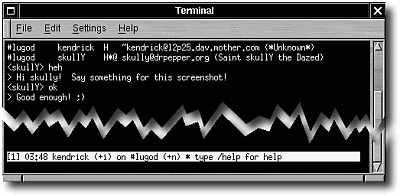
The top area of the screen shows you messages and other information regarding
the channel, as well as responses to any IRC commands you issue (see below).
Below this is a highlighted status bar showing you your nickname, what
channel you're in, the current time, etc.
The very last line is where you type messages. You can type more
characters than the width of your screen. The IRC client will scroll, and
when your message appears in the message area, it will be word-wrapped.
Graphical IRC
Under Linux
A number of LUGOD members enjoy using:
X-Chat (GTK-based)
Konversation (Qt/KDE-based).
(You can read some older documentation on how to set-up
X-Chat to let you easily connect to #lugod.)
Under Windows
Under MacOS
IRC Commands
There are better places to learn how to use IRC, but here are the most
common and useful commands:
/join #channel - Enter into a particular channel.
/who #channel - Show a list of all users in a
particular channel.
/who lugod/officers/* - Show a list of online LUGOD officers.
/whois username - Get info about a specific user.
/leave #channel - Leave a channel that you've joined.
/msg nickname message... - Send a private message to
another user on the IRC server.
/me action - Send a message in the third person.
(Example: "/me has to go now")
/quit - Quit IRC.
/help - Get help from your IRC client!
Graphical IRC clients will have many of these commands available using their
graphical interface.
If what you type does not begin with a forward-slash ("/"),
it will be sent to whatever channel you've joined, so be careful!
Common IRCisms
Here's a short list of acronyms. If someone uses one not listed that you
don't understand, don't be afraid to ask what it means.
- afaik - As far as I know
- afk - Away from keyboard
- aka - Also known as
- bbiab - Be back in a bit
- brb - Be right back
- fyi - For your information
- imho - In my humble opinion
- imo - In my opinion
- lugod - Linux User Group of Davis, obviously!
- re - Hello again
Like e-mail, "emoticons" (also known as happy faces) are popular on IRC.
They usually involve characters that look like this:
:) :^) <:^( >:^P
But sometimes people use these kinds of faces:
^_^
Hostname Cloaks on Libera.chat
Libera.chat offers the ability to have a hostname cloak. This is primarily
to show your affiliation and support for a group or project that you're associated
with on the network. LUGOD now has cloaks available for officers as well as active members of
our IRC channel!
For more information about getting a LUGOD cloak of your own,
contact the "root" (president) or "sys" (vice-president) officers.
To find a list of club officers online on Libera.chat, use the command: /who lugod/officers/*
Kicking and Banning
People known as operators (ops) have the ability to remove people from an
IRC channel. If you are rude, abusive or in any other way distruptive, you
will be removed by an operator. Please realize that just because you're
behind a monitor, you can't act anyway you feel. Even IRCers have feelings
(and tempers!)
|